Unlock Creative Potential with the Gaming Tool - Doodle Pack
If you're involved in digital creation, whether for professional projects or personal passion, you've likely encountered the bottleneck of asset creation. Designing unique, playful, and engaging graphic elements can consume hours of time that you'd rather spend on the core of your project. This is where a resource like the Gaming Tool - Doodle Pack becomes invaluable. At its core, it is a comprehensive library of stylized, hand-drawn vector graphics designed specifically for gaming contexts, but its utility stretches far beyond that initial label.
What Exactly Is the Gaming Tool - Doodle Pack?
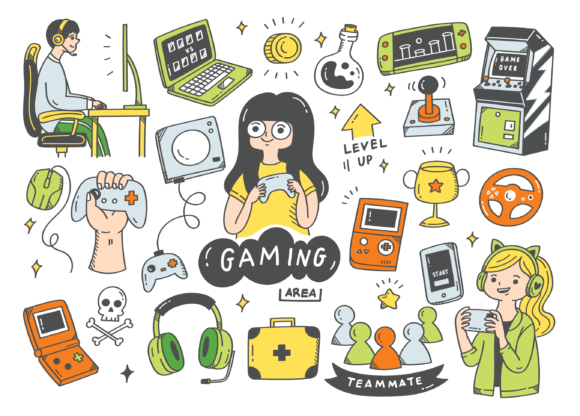
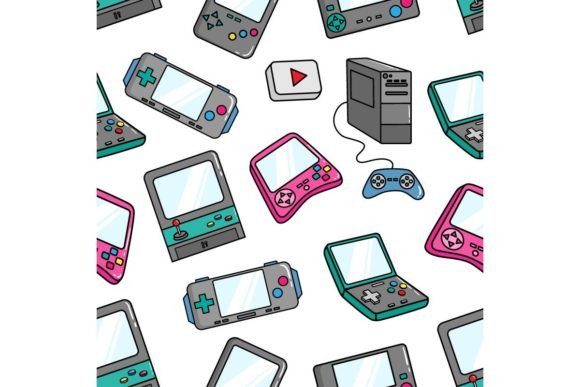
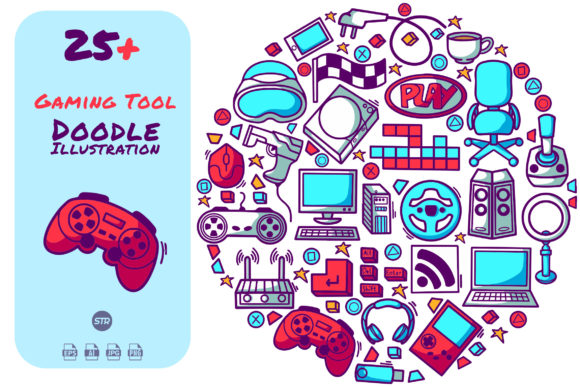
Think of it not as a single tool, but as a versatile toolkit. The pack provides you with 100 distinct vector files—individual graphic elements like controllers, skulls, stars, explosions, power-ups, shields, and abstract gaming motifs. These aren't just flat images; they are scalable, editable vectors. The specification of 300dpi resolution ensures crispness even for large-scale prints, while the available vector EPS 10 version guarantees compatibility with professional design software. The promise of easy modification and color change is key; you aren't just buying static icons, you're buying a malleable visual foundation you can adapt to your exact needs.
The Practical File Formats: Your Creative Flexibility
The included files—EPS 10, AI, JPEG, and PNG—are thoughtfully chosen to cover virtually every workflow. The EPS and AI files are for deep editing in vector programs like Adobe Illustrator or CorelDRAW. The JPEG offers a ready-to-use high-quality raster image for quick placements, and the PNG with its transparent background is perfect for immediate use in video editing, web design, or digital presentations without any tedious cropping. This multi-format approach means you can jump straight into implementation or dive into customization, depending on your deadline and vision.
Real-World Applications: Beyond the Game Screen
The "Gaming Tool" name suggests a primary use, but the doodle-style assets are inherently flexible. Let's explore concrete situations where this pack solves real problems.
For Indie Game Developers and UI Designers
Creating a cohesive visual identity for a game's user interface is a monumental task. Menus, buttons, HUD elements, and achievement icons all need to feel part of the same world. Using the Gaming Tool - Doodle Pack as a base, a developer can rapidly prototype UI elements. You can change the colors to match your game's palette, combine multiple vectors to create unique icons, and scale them perfectly for different screen resolutions without quality loss. This drastically reduces the time from concept to playable prototype, allowing you to focus resources on coding and gameplay mechanics.
For Content Creators and Streamers
The digital content space is visually competitive. Streamers, YouTubers, and podcasters covering gaming topics need engaging graphics for overlays, channel art, thumbnails, and end screens. A PNG of a doodle-style game controller or explosive effect can be instantly layered into a streaming overlay in OBS or added to a video thumbnail in Photoshop. The playful, non-threatening style of doodles is perfect for creating a friendly, approachable brand aesthetic. It helps visually communicate your niche without needing custom commissioned art for every new series or event.
For Marketing and Community Managers in the Gaming Industry
Community engagement often relies on quick, visually appealing graphics for social media posts, event announcements, newsletter headers, or forum badges. The Gaming Tool - Doodle Pack provides a consistent set of assets. Imagine creating a weekly "Friday Challenge" post for your community; you can use a modified vector from the pack as the header, changing its color each week to keep it fresh. The high-resolution JPEGs ensure posts look sharp on all devices. This consistency builds brand recognition while saving your marketing team from constantly sourcing new imagery.
For Educators and Instructional Designers
Creating educational materials about gaming, technology, or even using game-design principles in teaching requires relatable visuals. Tutorials, online course slides, and educational handouts benefit from light-hearted graphics that break up dense text. An educator explaining coding concepts could use a doodle of a "power-up" to symbolize a function that enhances code efficiency. The vectors are easy to modify to fit a more formal presentation style if needed, making them a bridge between playful engagement and clear instruction.
Considerations Before You Dive In
While the pack is designed for ease, a few practical considerations will help you integrate it most effectively into your workflow. First, assess your primary software. If you use Adobe Illustrator or similar vector software, you'll unlock the full potential of the AI and EPS files for customization. If you primarily work in photo-editing or non-vector software like Photoshop or Canva, the PNG and JPEG files will be your go-to, but remember you'll have less ability to fundamentally reshape the elements.
Second, think about stylistic cohesion. The doodle style is specific—it's casual and illustrative. It may not fit a project requiring hyper-realistic, gritty, or ultra-minimalist aesthetics. However, its strength is in projects that aim for friendliness, approachability, and a touch of informal creativity. Lastly, consider organization. With 100 files, it's wise to spend a little time when you first download the pack sorting them into categories that make sense for your projects—like "UI Elements," "Decorations," "Symbols," etc. This upfront investment pays off in speed later.
Its Strengths and Natural Limitations
The undeniable strength of the Gaming Tool - Doodle Pack is its time-saving versatility. It provides a ready-made visual vocabulary. For a small studio or solo creator, it can mimic the benefit of having a dedicated graphic designer on staff. The vector nature ensures professional output quality. A potential limitation is that, as a pre-made pack, the assets are not wholly unique. Your competitors could also purchase the same pack. This is mitigated by your ability to modify, combine, and color them, creating a derivative style that becomes uniquely yours. It's a foundation, not a final product.
Tailoring the Pack for Different User Needs
How you benefit depends entirely on your role and goals. A graphic designer might use the AI files to deconstruct elements, using a single doodle's line work as part of a larger, more complex composite illustration. A hobbyist creating a fan website might use the PNGs directly, enjoying the instant professional polish they add over using generic clip art. A board game designer could print the high-res JPEGs at 300dpi to create prototype card art and game components. The pack's value is proportional to your creativity in applying it.
The key observation is that the Gaming Tool - Doodle Pack democratizes quality graphic assets. It lowers the barrier for individuals and small teams to produce visually compelling work that stands out in crowded digital spaces. By focusing on the practical use cases—from speeding up game UI development to energizing a social media campaign—we see its true function: not as a niche gaming product, but as a broad-spectrum creative catalyst for anyone looking to inject a playful, illustrated energy into their projects with efficiency and control.