The Unicorn Gaming Esports Logo: A Designer's Guide to Getting It Right
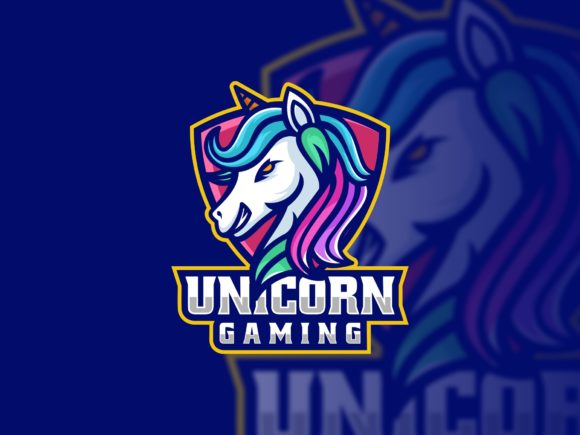
When you stumble upon the Unicorn Gaming Esports Logo, it immediately stands out as a professional, ready-made solution for a burgeoning team, a new gaming channel, or even a branded merchandise line. This isn't just a static image; it’s a comprehensive package of 100 fully editable, vector-based files. The promise of high quality, infinite scalability, and formats like AI, EPS, PDF, and PNG is incredibly appealing, especially if you’re not a seasoned graphic designer with hours to spend crafting a logo from scratch. However, the real value—and potential for missteps—lies in understanding exactly how to use this asset correctly to avoid outcomes that look amateurish or undermine your brand's potential.
Overlooking the Vector Foundation
A common initial misunderstanding is treating the Unicorn Gaming Esports Logo like a regular JPEG or PNG you download off the web. People see "PNG included" and might immediately use that file for everything, from their website header to a large printed banner. This is a critical error. The PNG files are conveniences for quick digital placement, but they have fixed resolutions. Using them for large-scale print or resizing them significantly will result in blurry, pixelated graphics that scream low effort.
The core power of this product is its vector formats (AI, EPS, CDR). Vector graphics are defined by mathematical paths, not pixels, meaning they can be scaled to the size of a billboard or shrunk to a business card without a single loss in detail or sharpness. The practical advice here is simple: for any permanent application, especially anything involving physical print or future resizing, open and use the vector files in software like Adobe Illustrator or CorelDRAW. This ensures your Unicorn Gaming Esports Logo maintains its professional integrity at any scale.
The Font Dilemma: It's Not Included, and That Matters
Another detail often overlooked until it becomes a pressing problem is the font situation. The logo is fully editable, meaning you can change the text "Unicorn Gaming" to your own team's name. But the fonts used in the original design are not bundled with the files. This isn't a limitation of the product; it's a standard practice due to font licensing. The mistake is assuming you can just use any similar font you have on your computer.
Using a mismatched font can drastically alter the logo's balance, energy, and professional cohesion. The product provides a crucial solution: a font links file within the documentation folder. This file directs you to where you can legally obtain the exact fonts used, often from free repositories. Before you begin any edit, locate this documentation folder, get the fonts, and install them on your system. Only then, with the correct fonts active in your design software, will your customized text maintain the original logo's aesthetic and impact.
Choosing the Wrong File Format for Your Task
With multiple file types included—AI, CDR, EPS, PDF, PSD, PNG—it's easy to pick one and hope it works for everything. Each format has a specific purpose. Using the PSD (Photoshop) file for major vector edits, for example, would be inefficient and limiting. For deep structural editing of shapes and colors, the AI or EPS files in Illustrator are your primary tools. The PDF is excellent for sending a high-quality, locked version to a printer or client. The PNG is perfect for quick web use, like social media avatars or forum signatures.
A better approach is to understand your immediate task. If you're customizing, start with the vector master file (AI/EPS). If you need a high-res image for a video overlay, the PNG might suffice. Always keep the original vector file as your master archive. This strategic choice avoids workflow bottlenecks and ensures you always have the right tool for the job, preserving quality and saving time.
Editable Doesn't Mean "Redesign Everything"
The "fully editable" feature is a powerful invitation, but it can lead to a creative pitfall: over-customization. Beginners might feel tempted to change every element—altering the unicorn's silhouette, radically shifting the color palette, or adding completely new graphics. While possible, this often dilutes the professional design balance that made the logo attractive in the first place.
The more practical and safer path is to treat the Unicorn Gaming Esports Logo as a sophisticated template. Make the essential changes: update the text to your brand name, perhaps adjust accent colors to match your existing palette, and maybe resize certain elements slightly. But respect the core composition. This approach leverages the professional design work already done, ensuring your final result looks polished and cohesive, rather than a disjointed experiment. It’s about adaptation, not wholesale reinvention.
Neglecting the Color Profile for Print
If your journey with the logo goes beyond the screen to physical merchandise—like team jerseys, mouse pads, or posters—a technical detail becomes paramount: color profiles. Digital colors (RGB) and print colors (CMYK) are not the same. A vibrant electric blue on your monitor might print as a duller, more muted shade if you send an RGB file to a print shop.
Before sending any file for professional print, open the vector logo in your design software and convert the color mode to CMYK. Check the colors after conversion; you may need to make slight tweaks to ensure they remain vibrant. This pre-flight check, often overlooked by non-designers, guarantees that the Unicorn Gaming Esports Logo you see on screen is the one you get on your products, maintaining brand consistency across all media.
What to Check Before You Commit
Before finalizing your purchase or diving into edits, do a quick audit of your own tools and needs. Do you have access to software that can open vector files (like Illustrator, CorelDRAW, or free alternatives like Inkscape)? Have you located the documentation folder and checked the font links file to confirm the fonts are available and free for your use? What is your primary use case—web, print, or both? Answering these questions upfront prevents the frustration of having a powerful asset you cannot effectively utilize.
Ultimately, the Unicorn Gaming Esports Logo package is a tremendous resource that bridges the gap between professional design and accessibility. By understanding its vector nature, respecting the font process, choosing file formats wisely, editing with intention, and preparing files correctly for their final medium, you can avoid the common pitfalls that turn a great asset into a mediocre result. The goal is to let this scalable, editable logo elevate your project with the quality it was designed to provide, making your gaming brand look as sharp and prepared as your team aims to be.